

About This Item
Overview
Details
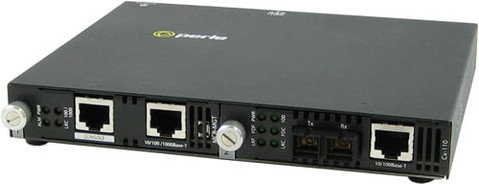
Perleís advanced line ofManaged 10/100 Ethernet Media Converters, transparently connect UTP ethernet copper to multimode or single mode fiber. While providing an economical means of extending your existing copper based network connection, these media converters are SNMP manageable to enable complete control and status viewing of your fiber links.
Perle 10/100 Managed Media Converters come standard with extensive cost and time saving features. In addition, a lifetime warranty and free worldwide technical support make Perle's Managed 10/100 Ethernet Converters the smart choice for IT professionals.
Documentation

Features
- 10/100Base-TX to 100Base-X Fiber Media Converters
- Extend network distances up to 120km
- SC, LC and ST Media Converters
- Advanced Features: Link Pass-Through, Far-End Fault, Auto-MDIX
- Manage via SNMP, CLI - Telnet/SSH, Internet Browser, or
PerleVIEW Centralized Management Package
SMI-110 Managed Fast Ethernet Media Converter Features
| QOS ( Quality of Service ) |
|
| VLAN Tagging |
|
| Unknown Multicast Frame filtering | When enabled, Multicast frames with an unknown destination address are not allowed to egress the port |
| Unknown Unicast Frame filtering | When enabled, Unicast frames with an unknown destination address are not allowed to egress the port |
| Unidirectional Ethernet | When enabled, provides the ability to restrict port to one-way traffic flow. Used in applications such as unidirectional video broadcasting as well as providing security for ethernet connections in accessible public areas |
| Configuration Mode selection | Select whether to use the on-board DIP switches or the management software for mode selection |
| Auto-MDIX | Can manually set Auto or MDIX on the copper port via on-board strap or via the management software. Auto-MDIX (automatic medium-dependant interface crossover) detects the signaling on the UTP interface to determine the type of cable connected (straight-through or crossover) and automatically configures the connection when enabled. With Auto-MDIX enabled, either a straight-through or crossover type cable can be used to connect the media converter to the device on the other end of the cable. |
| Converter Information |
|
| DIP switch settings | View hardware DIP switch settings |
| Selectable Max Packet Size | Set max packet size to 1522, 1518 or 2048 ( default ) |
| 10BaseT Extended Distance | Normal/extended – default Normal. By configuring as ìextendedî, the 10baseT receiver sensitivity is increased providing the possibility of a 10BaseT connection greater than 100m. |
| Port Control | Enable or disable individual fiber or copper port on the converter |
| Copper Port Status |
|
| Fiber Port Status |
|
| Control |
|
| Detailed port statistics | To assist in troubleshooting copper and fiber links, an extensive list of ingress and egress counters for both copper and fiber ports are available. These statistics can be viewed locally via the management module or from a central SNMP NMS on the network |
| Auto-Negotiation (802.3u) | The media converter supports auto negotiation on the 10/100Base-TX interface. |
| Link Pass-Through | With Link Pass-Through the state of the UTP
receiver is passed to the fiber transmitter
to make the media converter appear transparent
to the end devices that are connected. In addition
if Far-End Fault is enabled the media converter
can turn off the 10/100Base-TX transmitter when
a FAR-End Fault is received. Using Link Pass-Through with Far-End Fault minimizes data loss when a fault occurs. Should a fault occur, the end devices have the indication of a failure available to them making trouble shooting easier. |
| Far-End Fault (FEF) | The media converter implements the
802.3 standard for Far-End Fault for the indication and detection of
remote fault conditions on the 100Base-X fiber connection. With Far-End
Fault enabled the media converter transmits the Far-End Fault Indication
over the 100Base-X fiber connection whenever a receive failure is
detected on the 100Base-X fiber connection. The media converter
continuously monitors the100Base-X fiber connection for a valid signal. The action the media converter takes on receiving a Far-End Fault Indication is dependent on the Link Pass-Through switch setting. |
| Pause (IEEE 802.3xy) | Pause signaling is an IEEE feature that temporarily suspends data transmission between two devices in the event that one of the devices becomes overwhelmed. The media converter supports pause negotiation on the 10/100Base-TX copper connection. |
| Remote Loopback | The media converter is capable of performing a lookback on the fiber port. |
SMI-110 Advanced Management Features
Enterprise and carrier-grade security is available through the support of strong authentication systems such as TACACS+, RADIUS and LDAP. Secure in-band access is assured via SNMPv3, SSH CLI and secure HTTPS Internet browser.
| SNMP |
|
| Telnet / SSH CLI access | In-band command line access via Telnet or SSH application |
| Internet Browser access |
|
| Console port CLI access | Out-of-band command line access via Cisco compatible RJ45 serial console port using common ìrolledî CAT5 cable. Console port can be enabled ( default ) or disabled |
| Concurrent management sessions | Run multiple management sessions simultaneously for multiple users |
| Inactivity timeout | Protect secure management sessions by setting an inactivity timeout value |
| Alert event reporting | Alert level events are stored in the local event log and sent as:
|
| Advanced IP feature set |
|
| Advanced Management User Authentication with primary and secondary server support |
|
| Advanced Management User Authorization and Accounting |
|
| Encryption |
|
| Access Control List | An access control list can be created which can filter out only those workstations that are authorized to access the management resources. Filter on IP and/or Ethernet MAC addresses |
| Network Services Filter | Enable only those network services on the management module that are allowed on your network ( Telnet, SSH, HTTP, HTTPS, SNMP ) |
| Firmware download | Update the latest level firmware for management and media converter modules via TFTP or PerleVIEW |